Saturday, 8 June 2019

The Project Organization

Different organizations have different structures, these differences in organization structure will translate into the organization of a project.

three types of organizational structures are

Functional: also known as traditional, hierarchical or vertical.

Organizations that utilize the Functional structure have a clear chain of command, typically if a project resides inside of a functional unit for example HR, that PM will generally report to the functional head and build the majority of their team from within that functional unit.
Pro'sCon's
SimpleCoordination between functions can be difficult
Direct Access to technical resourcesProject can take a back seat to operations
Team members report to their boss

this structure is best when the project is contained within one functional area, since as a PM you'll be reporting to a functional head who's in charge of the personnel, money and scope you'll have very little power, you'll be more of a project coordinator than manager. You'll also be competing against operational priorities for resources. In this type of structure you'll have to rely heavily on soft skills to get what you need to be successful.

Pure Project Organization
this is the opposite of the functional organization, in the projectized organization the PM is the boss, is responsible for time, resources and scope. The personnel are 100% allocated to the project, the PM has full authority. In organizations that utilize the pure project approach to organization every endevour is temporary. Project work isn't organized by function but is rather allocated to a group of resources that come together to solve that particular unique problem.
In such an organization all of the team members report directly to the PM, and only work on their current project deliverables; this type of approach is ideal for multi year projects that require a dedicated team to solve a complex problem.

Pro'sCon's
PM has full authority, all members report to PM Temporary all good things must come to an end
Simple structure don't have to negotiate for resources Resources can't be shared, must keep team busy
Direct access to permanent resources allocated to your project can create duplication
strong team identity and commitment, bonds form between colleagues

Matrix Organization
This organization structure tries to leverage the Pro's of both the functional and pure project organizations. In a matrix organization there are traditional functional units, but the projects will draw members from these functional units, but unlike the functional organization structure the resources are shared by the PM and the functional head, meaning that they have two bosses. Matrix organizations come in multiple flavors, ones that are considered weak will take on more of the traditional functional organization attributes whereas ones that are considered strong matrix organizations will take on more of the characteristics of the pure project organization.

the distinction of whether a matrix organization is considered

  • Weak: functional head controls resources
  • Balanced: functional head and PM share responsibility of resources
  • Strong: PM controls resources

Pro'sCon's
Shared & flexible access to resources Employees have two Bosses
Resources are project focused Increased Conflict, employees have to balance operational with project work
Shared commitment between PM and functional head Communication complexity

As you can see none of these approaches are perfect the trick is to pick the approach that best fits the particular project.

Project length: for projects that are cross-functional and run multiple years the preferred structure is pure project or strong matrix.

# of functional areas needed: when numerous functional areas are required to complete a project than the more valuable it is to use a strong matrix or pure project approach.

Functional knowledge is key: when the project is within a functional unit and the knowledge is very niche than a functional organization may be best suited.


Monday, 3 June 2019

Project Selection

Organizations generally don't have enough resources (people or money) to complete every project they'd like to, thus what they need to do is pick the projects that will have the highest Return on investment. The collection of projects that an organization considers key to it's success is referred to as a project-portfolio; this project-portfolio is a collection of projects that can realistically be completed in a timely fashion and help the organization achieve it's strategic goals, which are high level goals to benefit the company in the grand scheme.

Organizations generally have limited resources, more often than not they don't have enough resources to realistically complete every project they'd like to and thus they need some sort of logical way to select projects with the highest ROI; here are three financial selection processes:

Payback Period
This approach is a simple calculation: Payback period = (Initial investment)/(Periodic cash flow) this means that if our project cost $100 and our projected returns where $20 a year it would take 5 years for this project to break even on the investment, after that the project would begin to generate revenue for the organization. The downside of this approach is that it doesn't factor in the time value of money, meaning that because of inflation a $100 investment today is worth less in 5 years.

Net present value
Is a fairly straightforward calculation where
NPV = sum((ROI per year)/(1+discount value)^(Year Count)) - initial investment

so that means that if your project has an initial investment of $100
a projected ROI for year 1 of $20
a projected ROI for year 2 of $10
a projected ROI for year 3 of $25
a projected ROI for year 4 of $30
and a discount rate of 10%

npv = (20/(1+0.1)^1) + 10/(1+0.1)^2 + 25/(1+0.1)^3 + 30/(1+0.1)^4 - 100

npv = 20/1.1^1 + 10/1.1^2 + 25/1.1^3 + 30/1.1^4 - 100

npv = 20/1.1 + 10/1.21 + 25/1.331 + 30/ 1.4641 - 100

npv = 18.18 + 8.26 + 18.78 + 20.49 -100

npv = 65.71 - 100

npv = -34.29


NPV of 0: project will make enough money to meet the organizations needs
NPV of positive:project will surpass the requirements of the organization
NPV of Negative: project will fall short of the organizations requirements

Profitability index
is a simple ratio
PI = present value of future cash flows/Initial investment,

>1: financial benefits to organization
<1: financial drain to organization also the NPV will be 0.

these calculations are only as good as their estimates.

Numbers are great but sometimes cold hard numbers are trumped by non-financial criteria such as
  • Legal requirements: to meet the requirements of a new law
  • Competitive advantage: to beat the competition to market for example
  • new tech or process: to facilitate earnings in the future.
organization use a combination of financial and non financial criteria to select projects for their portfolio. a typical project selection process maybe something like
  1. Business plan identifies project opportunities aligned to the organization's strategy or an employee has an idea for a project and reviews it with their management team for concurrence to proceed and get allocated funding. 
  2. Management submits project information on a standardized form. This form typically includes basic level business criteria such as the project goals and deliverables, project purpose, the business reason or business problem addressed by the project, and general information about the project cash outflow, inflow, and market potential. 
  3. Project Portfolio team reviews the project suggestions and pre-selects projects based on a set of criteria that best matches the strategic plans of the organization. 
  4. Projects undergo additional feasibility studies to confirm viability and confirm the financial and non-financial benefits. This typically includes a review of the project resource requirements. 
  5. A final set of projects is prioritized and selected with Project Managers assigned to begin Project Initiation.
organizations will generally stick to their project selection process and not deviate from it. while reviewing the projects in their portfolio trying to ensure that only high value projects are committed to because the more projects an organization is committed to the fewer resources can be allocated to each and thus diluting the value added.

Saturday, 1 June 2019

Project Management Office

The Project Management Office(PMO) or just Project Office (PO) is an internal unit that is sometimes set up by organizations to help facilitate project management. They're function is to increase the project success ration by providing support to projects and project managers.

The PMO can provide a wide variety for services
  • Be responsible and support the organizations Project Management methodologies and processes.
  • Provide Project management expertise and training
  • Project auditing
  • Support Organizations project management tools.
  • Serve as a repository for Best practices 
  • Provide standards for collecting project KPI's as well as reporting and measuring project progress
  • Facilitate project reviews: lessons learned.
  • Help allocate resources across multiple projects.
  • Assist with project selection and Project portfolio management. 
PMO's often try to standardize the Project management approach within an organization, keep all PM's using constant PM techniques, tools, and processes. PMO's are responsible to support projects and project managers doing what they can to help increase the success rates of projects.

Thursday, 9 May 2019

Initialization before instantiation

Are you telling me that I can initialize a class without running the default constructor? and why on earth would I want to do this?

the answer is yes you can and when you're unit testing.

Within the system.runtime.serialization namespace there's a static FormatterServices class with a GetUnitializedObject(Type) method, this method lets you create a new instance of an object without constructing it.


using System;
using System.Runtime.Serialization;

namespace pav.InitializationB4Instantiation
{
    class Dog 
    {
        string name;
        public string Name {
            get => name ?? "Spot";
            set => name = value;
        }

        public Dog() => Console.WriteLine($"Name: {Name}");
    }

    class Program
    {
        static void Main(string[] args)
        {
            //Create instance of dog without instantiating the object
            var dog = FormatterServices.GetUninitializedObject(typeof(Dog));

            //get an instance of the parameterless constructor of Dog
            var dogCtor = typeof(Dog).GetConstructor(Type.EmptyTypes);

            //Set the Name property to "Fluffy" 
            ((Dog)dog).Name = "Fluffy";
           
            //instantiate Dog
            dogCtor.Invoke(dognull);

            //instantiate a default dog
            new Dog();
        }
    }
}


and this is what results


Obviously this is an extremely contrived example, but the take away is that you can modify the classes properties before "newing" up an instance of it which can be vary useful when unit testing code.

Friday, 5 April 2019

Xamarin's Command implementation of ICommand

When using Xamarin forms Command class which Implements the ICommand interface, there is one strange caveat to look out for, and that is that the CanExecute func must be declared within the constructor of the ViewModel or have a "Lazy" implementation otherwise it will never fire. What i mean is if you have the following xaml


<StackLayout Grid.Row="2" Orientation="Horizontal" Margin="10,5">
    <Entry Placeholder="Task name" Text="{Binding TaskName, Mode=TwoWay}"
        HorizontalOptions="FillAndExpand" />
    <Button Text="+" FontSize="Large" FontAttributes="Bold" WidthRequest="70"
        BackgroundColor="{StaticResource ContrastColor}"
        TextColor="{StaticResource Backgorund}"
        Command="{Binding AddTaskCommand}" />
</StackLayout>


and it's coupled with this codebehind


string taskName;
public string TaskName
{
    get => taskName;
    set
    {
        base.SetProperty(ref taskNamevalue);
        ((Command)AddTaskCommand).ChangeCanExecute();
    }
}

public ICommand AddTaskCommand { get => new Command(
    execute: () => TaskName = string.Empty,
    canExecute: () => true);
}


Then the canExecute func is evaluated on the initial page load and the execute action is executed whenever the command is called, however it is never called again, namely when the ChangeCanExecute method is called from the TaskName's setter the condition is never reevaluated and the add button remains in whatever state it was on the initial page load.

Let's add some logic into the can execute func


string taskName;
public string TaskName
{
    get => taskName;
    set
    {
        base.SetProperty(ref taskNamevalue);
        ((Command)AddTaskCommand).ChangeCanExecute();
    }
}

public ICommand AddTaskCommand
{
    get => new Command(
        execute: () => TaskName = string.Empty,
        canExecute: () => !String.IsNullOrEmpty(TaskName));
}


now under these conditions the "Add" button shall never become enabled. Now if we simply assign our command in the constructor of the view model everything works just fine.


string taskName;
public string TaskName {
    get => taskName;
    set {
        base.SetProperty(ref taskNamevalue);
        ((Command)AddTaskCommand).ChangeCanExecute();
    }
}

public ICommand AddTaskCommand { getprivate set; }

public ProjectPageViewModel()
{
    AddTaskCommand = new Command(
        execute: () => TaskName = string.Empty,
        canExecute: () => !String.IsNullOrEmpty(TaskName));
}


bizarre yes, why you may ask? well a kind soul pointed it out to me that in the above implementation every single time you call the AddTaskCommand you receive a new instance of the Command implementation, which is why it works when you assign it in your constructor but not when you define it inline. So another alternative to defining all your Commands in your constructor is to use a backing field for the AddTaskCommand property and use a lazy implementation for your commands.


string taskName;
public string TaskName
{
    get => taskName;
    set {
        base.SetProperty(ref taskNamevalue);
        ((Command)AddTaskCommand).ChangeCanExecute();
    }
}

ICommand addTaskCommand = null;
public ICommand AddTaskCommand {
    get {
        this.addTaskCommand = this.addTaskCommand ?? new Command(
            execute: () => TaskName = string.Empty,
            canExecute: () => !String.IsNullOrEmpty(TaskName));
        return addTaskCommand;
    }
}


in the above we check if the addTaskCommand backing field is null, if yes then we assign an instance of command to it, if not then we just return it, this keeps us from having to define all of our commands within the constructor.

Thursday, 14 March 2019

Create custom directives

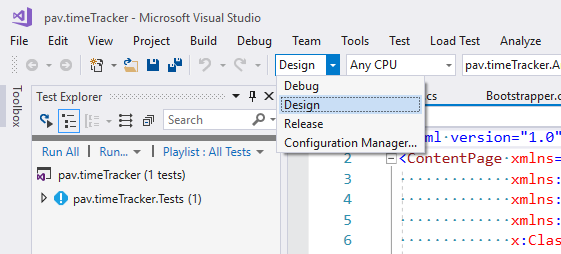
Visual studio projects come with two predefined directives "DEBUG" and "TRACE", there is no RELEASE directive defined. Visual studio projects also come with two configurations namely "Debug" and "Release"; when working with xaml I create a third configuration "Design" I do this so that i can have two sets of view models, design ones with static values and dev ones for whoever is building the ViewModels helping to facilitate parallelism between building the logic and the views.

To do this firstly add a "Design" configuration:
Build->Configuration Manger

once you have the Configuration Manager window open

add a new configuration 

for that new configuration give it the name "Design" and copy the settings from debug.


Click "OK" and your new Solution Configuration will be created

to ensure that it was created check under your solutions configuration dropdown menu 

with that done next open up your project properties
Project -> <Project namespace> properties

next on the project properties window in the "Conditional compilation symbols" textbox enter in DESIGN

once that's done just hit save. 

now in your c# you have access to a "DESIGN" directive letting you write code like the following

#if DESIGN
            //create Navigation service with design time view models
#else
            //create Navigation service with dev time view models
#endif

One caveat is that you have to add your custom "DESIGN" directive to all relevant projects within your solution.

this can be used to create a navigation service that only contains Design time ViewModels so that views can be developed with design time data while ViewModels are developed and as long as the two implement the same interface the two should seamlessly merge. 

Sunday, 10 February 2019

Rename files to guid

Let's say you wanted to rename all the files within a directory to GUID's why? who know maybe you just do, well the following powershell will get you there

Dir -filter *.docx| %{Rename-Item $_ -NewName ("{0}.docx" -f [guid]::NewGuid())}

get me all the files with a docx extension, then for each one of them give it a new name preserving the extension but changing the name into a guid