In digital transformation there are four primary pillars of value:
- Customer expectations
- Operations
- Employee experience
- Business models
In digital transformation there are four primary pillars of value:
Digital disruption happens when one organisation leverages technology to fundamentally change the way an industry works while gaining a competitive advantage, often times resulting in taking a industry or market lead, leaving the competition struggling for survival. Digital disruptors accomplish this by providing more value to customer at a lower capital and labour costs, generally by leveraging technology.
The past twenty years is rife with such examples:
Digital transformation is the integration of digital technology into business models and processes, resulting in changes to how an organisation operates and delivers value to employees and customers alike. It enables organisations to take advantage of new opportunities created by digital technologies, leading to improved processes, enhanced customer experiences and increased competitiveness. In essence digital transformation leverages technology to optimise and often times redefine business models to provide more value to customers as well as employees.
Some of the benefits of a successful digital transformation can include:
Sound's great right? If it was only that easy, Digital transformation is not a simple or straightforward process. It involves a significant shift in organisational culture, processes, and technology. It requires a deep understanding of technology, data, and customer needs, as well as the ability to adapt to changes in the market. Additionally, implementing digital solutions often involves a large investment of time, resources, and money. It also requires overcoming resistance to change from employees, stakeholders, and customers. Overall, digital transformation is a complex journey that requires careful planning, execution, and continuous improvement.
Due to its complexity, digital transformation requires expertise to successfully implement. Experienced professionals must analyse and understand the current state of the organisation, where it needs to be in the future, conduct a gap analysis between the two states, and develop a plan for bridging that gap. This includes not only implementing new technology and processes, but also managing the change to ensure adoption and buy-in from customers, stakeholders, and employees. The digital transformation team must also be able to identify and manage any potential roadblocks, risks, and challenges that may arise during the transformation process. Without this level of expertise, the digital transformation process is likely to stall or fail, resulting in missed opportunities and wasted resources. Hence, having the right expertise is crucial in ensuring the success of digital transformation.
To help guide an organisation, we can follow the digital transformation compass, a twelve step representation of an organisational digital transformation journey. These twelve steps will minimise risk and cost during a transform while maximising engagement and chances of success.
![]() |
Azure Blob storage is Microsoft's object storage solution for the cloud. Blob storage is optimized for storing massive amounts of unstructured data. Unstructured data is data that does not adhere to a particular data model or definition, such as text or binary data. It is ideal for flat-files, images, videos and sound files.
Though there are four types of Blob storage types: Standard general, Premium block blobs, Premium page blobs, and Premium file shares; odds are you are going to need the standard general.
| Storage account type | Supported storage services | Usage |
|---|---|---|
| Standard general-purpose v2 | Blob, Queue, and Table storage, Azure Files | Standard storage account type for blobs, file shares, queues, and tables. Recommended for most scenarios using Azure Storage. If you want support for NFS file shares in Azure Files, use the premium file shares account type. |
| Premium block blobs | Blob storage | Premium storage account type for block blobs and append blobs. Recommended for scenarios with high transactions rates, or scenarios that use smaller objects or require consistently low storage latency. |
| Premium page blobs | Page blobs only | Premium storage account type for page blobs only. |
| Premium file shares | Azure Files | Premium storage account type for file shares only. |
Each of the types has 3 tiers of access:
sdf
Now that we have our Resource group and App service plans set up, let's create a Web App service. A web app service can contain either a traditional web application such as on made using html or an API.
It's pretty straight forward, this time go to your resource group and create the 'Web App service' from there.
Then, as before select the create drop down at the bottom of the web app card and choose new 'web app'
Now this configuration is a bit more complicated
to select the previous plan that we created, our OS and region have to match, in our previous post we configured it to be west Europe and Windows at least in the PowerShell, these two properties filter which App service plans we can connect our web app service two, meaning that an App service and it's plan must be of the same OS type as well as in the same geographic region, however they do not have to be in the same resource group.Before we create our application, go to the monitoring tab, this is because, by default app-insights is enabled, though this can be a useful service, it can also be a pricy one depending on your app usage, so I generally disable it.
With that done, as aways it's PowerShell time.
An app service can be thought of as the runtime environment in azure for your application, it could be an API, or a web app or a SPA (Single page application, Angular, React, Vue.js, etc). However before we can create an App Service we need an App service Plan.
An App service plan, can be thought of as the infrastructure for your application, as in all things in life, you get what you pay for, the more expensive the app service plan the more 'Horsepower' you have, the question you must ask yourself do I need a Porche to get my groceries... the answer is generally yes if you are a god damn douche-bag... otherwise just get a ford escort.
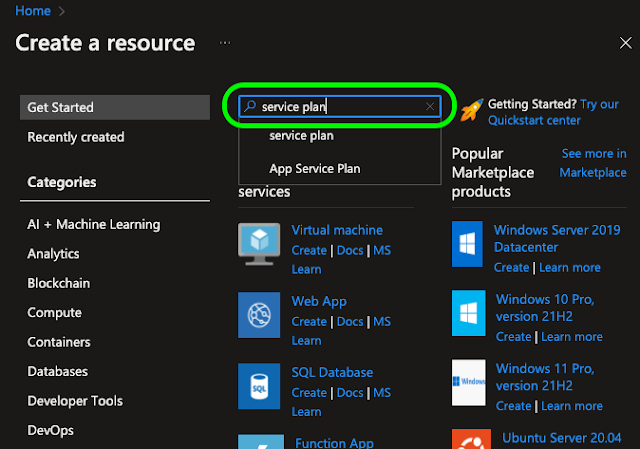
To set add a service plan to your Resource group click the 'Create a resource' button on the home screen of your azure portal.
One caveat, by default the PowerShell command 'New-AzAppServicePlan' will create a Windows based app service plan, according to the documentation on MSDN, by appending the -Linux switch this should not be the case, however when I tried it, I kept getting an "A parameter cannot be found that matches parameter name 'Linux'" exception, kind of a pain in the arse, one day I hope to come back and figure that out.
Before we can configure just about anything in azure we need to create a 'Resource group' to hold our 'stuff'. If your are wondering what a resource group is in azure, you can think of it as a logical container for resources linked with your subscription. Basically it's a way to organise the things out deploy, those could be virtual machines, storage accounts, virtual networks, app services, app service plans, blob storage, etc. Basically any resource within azure must be stored within a resource group. One caveat is Azure services, they generally run at the subscription level, which is more ore less the thing you pay for.
To setup a resource group is pretty simple, log into your azure portal, and click the resource groups icon
you should see something like the following