Sunday, 3 May 2015

ArrayList

An ArrayList is an interesting data structure that lets us create a list of different types of objects, that is we can cast classes as objects and box types.

Lets start by first create a simple person class.

   
    public class Person
    {
        public string Name { get; set; }
        public int BirthYear { get; set; }
        public Person(string Name, int BirthYear)
        {
            this.Name = Name;
            this.BirthYear = BirthYear;
        }

        public override string ToString()
        {
            return $"{this.Name} born {this.BirthYear}";
        }
    }


Just as before a very simple class which allows us to instantiate an object with two properties constructing a representation of a person.

Now in our main let's create an arraylist of various types


    using System.Collections;

    var arrayList = new ArrayList() { 1, "two", 3.4, 'a', new char[] { 'a', 'b', 'c' }, new Person("Pawel", 84) };

    var i = 0;
    foreach (var o in arrayList){
        var t = o.ToString().Length < 7 ? "\t\t" : "";
        Console.WriteLine($"{i++}) {o}\t{t} is of type {o.GetType()}");
    }

    //Gets or sets the number of elements in the ArrayList
    Console.WriteLine($"\nCapacity of an arraylist included sub-array counts {arrayList.Capacity}");

    //Gets the number of actual elements in the ArrayList
    Console.WriteLine($"Count of an array list only returns the number of elements in the array list {arrayList.Count}\n");


this lets us hold a cornucopia of types in one collection. In the above we have, Integers, characters, character arrays and even our own Person type.

One caveat to be aware of is that if we try to use the 'sort' method on our array list, each element within the collection must implement the IComparable interface and each element must be comparable with all other in the arraylist which could prove to be challenging. In instances of hierarchy, it is pretty straight forward, just ensure that your base class implements the IComparable interface, and you should be ok, for example if you have an 'Employee' class which inherits from a 'Person' class, then you can add both to an array list and implement the 'sort' method, just like you would in a regular array of Persons.

    
    public class Person : IComparable {
        public DateOnly Birthdate { get; set; }
        public string Name { get; set; }

        public Person(string name, DateOnly birthdate)
        {
                this.Name = name;
                this.Birthdate = birthdate;
        }
        public virtual int Age {
            get{
                // Save today's date.
                var today = DateTime.Today;

                // Calculate the age.
                var age = today.Year - Birthdate.Year;

                // Go back to the year in which the person was born in case of a leap year
                if (Birthdate.Year > today.AddYears(-age).Year) age--;
                    return age;
            }
        }

        public override string ToString()
        {
            return $" {this.Name} is a {this.GetType().Name} and is {this.Age} years old";
        }

        public int CompareTo(object? obj)
        {
            var other = (Person)obj;
            if(other != null)
                if(this.Age - other.Age < 0)
                    return   1;
                else if(this.Age - other.Age > 0)
                    return -1;
            return 0;
        }
    }

    public class Employee : Person
    {
        private static int runningId = 0;
        public int idNumber { get; set; }
   
        public Employee(string name, DateOnly birthdate) : base(name, birthdate)
        {
            this.idNumber = ++runningId;
        }

        public override string ToString()
        {
            return $"{base.ToString()} with id Number: {idNumber}";
        }
    }


Since we implemented the IComparable interface on our base Person class we can easily use the Array 'sort' method.


    using System.Collections;
    internal class Program
    {
        private static void Main(string[] args)
        {
            Console.WriteLine("\nArray list:");

            var arrayList = new ArrayList() {
                new Person("Pawel", new DateOnly(1984, 01, 31)),
                new Employee("John", new DateOnly(1988, 2, 12))
            };

            arrayList.Sort();

            foreach (var person in arrayList)
                Console.WriteLine(person);

            Console.WriteLine("\nNormal array:");
            var array = new Person[] {
                new Person("Pawel", new DateOnly(1984, 01, 31)),
                new Employee("John", new DateOnly(1988, 2, 12))
            };
    
            Array.Sort(array);
            foreach (var person in array)
                Console.WriteLine(person);
        }
    }


As you can see since employee inherits from person it leverages persons implementation of the IComparable interface letting us sort our array list, had we added an object that didn't inherit from person and couldn't be compared to a person then we'd get an exception.

However, if as below we really stretched it and implemented the IComparable interface in such a fashion that we could compare different objects to each other that would still be valid as shown below in our redefined Person class followed by our new Dog class.


    public class Person : IComparable {
        public DateOnly Birthdate { get; set; }
        public string Name { get; set; }

        public Person(string name, DateOnly birthdate)
        {
                this.Name = name;
                this.Birthdate = birthdate;
        }
        public virtual int Age {
            get{
                // Save today's date.
                var today = DateTime.Today;

                // Calculate the age.
                var age = today.Year - Birthdate.Year;

                // Go back to the year in which the person was born in case of a leap year
                if (Birthdate.Year > today.AddYears(-age).Year) age--;
                    return age;
            }
        }

        public override string ToString()
        {
            return $" {this.Name} is a {this.GetType().Name} and is {this.Age} years old";
        }

        public int CompareTo(object? obj)
        {
            dynamic otherobj as Person != null ? (Person)obj : obj as Dog != null ? (Dog)obj
                : throw new NullReferenceException();  

            if(other != null)
                if(this.Age - other.Age < 0)
                    return   1;
                else if(this.Age - other.Age > 0)
                    return -1;
            return 0;
        }
    }

    public class Dog : IComparable
    {
        public DateOnly Birthdate { get; set; }
        public string Name { get; set; }
       
        public Dog(string name, DateOnly birthdate)
        {
            this.Name = name;
            this.Birthdate = birthdate;
        }

        public int Age {
            get{
                // Save today's date.
                var today = DateTime.Today;

                // Calculate the age.
                var age = today.Year - Birthdate.Year;

                // Go back to the year in which the person was born in case of a leap year
                if (Birthdate.Year > today.AddYears(-age).Year) age--;
                return age * 7;
            }
        }

        public override string ToString()
        {
            return $" {this.Name} is a {this.GetType().Name} and is {this.Age} years old";
        }

        public int CompareTo(object? obj)
        {
            dynamic other = obj as Person != null ? (Person)obj : obj as Dog != null ? (Dog)obj
                :  throw new NullReferenceException();

            if(other != null)
                if(this.Age - other.Age < 0)
                    return   1;
                else if(this.Age - other.Age > 0)
                    return -1;
            return 0;
        }
    }


Notice that in the above we introduced the dynmaic keyword for our object type, that just means that our other type will be defined at runtime and not compile time. Now if we run our program,


    using System.Collections;

    internal class Program
    {
        private static void Main(string[] args)
        {
            Console.WriteLine("\nArray list:");

            var arrayList = new ArrayList() {
                new Person("Pawel", new DateOnly(1984, 01, 31)),
                new Employee("John", new DateOnly(1988, 2, 12)),
                new Dog("Spot", new DateOnly(2011,2,15)),
                new Dog("Kitcha", new DateOnly(2020,2,15))
            };
   
            arrayList.Sort();

            foreach (var person in arrayList)
                Console.WriteLine(person);

            Console.WriteLine("\nNormal array:");
            var array = new Person[] {
                new Person("Pawel", new DateOnly(1984, 01, 31)),
                new Employee("John", new DateOnly(1988, 2, 12))
            };

            Array.Sort(array);
            foreach (var person in array)
                Console.WriteLine(person);
        }
    }


we see that in our array list, we have two distinct types 


now just because we can, doesn't mean we should, however if you must, rather than implementing the same code in the Dog and person class, we can extract it and create a PersonToDogComparrer, as is shown in the next example.


    using System.Collections;

    public class Person
    {
        public DateOnly Birthdate { get; set; }
        public string Name { get; set; }

        public Person(string name, DateOnly birthdate)
        {
            this.Name = name;
            this.Birthdate = birthdate;
        }
        public virtual int Age
        {
            get
            {
                var today = DateTime.Today;
                var age = today.Year - Birthdate.Year;

                if (Birthdate.Year > today.AddYears(-age).Year) age--;
                    return age;
            }
        }

        public override string ToString()
        {
            return $" {this.Name} is a {this.GetType().Name} and is {this.Age} years old";
        }
    }

    public class Dog
    {
        public DateOnly Birthdate { get; set; }
        public string Name { get; set; }

        public Dog(string name, DateOnly birthdate)
        {
            this.Name = name;
            this.Birthdate = birthdate;
        }

        public int Age
        {
            get
            {
                var today = DateTime.Today;
                var age = today.Year - Birthdate.Year;

                if (Birthdate.Year > today.AddYears(-age).Year) age--;
                return age * 7;
            }
        }

        public override string ToString()
        {
            return $" {this.Name} is a {this.GetType().Name} and is {this.Age} years old";
        }
    }

    public class Employee : Person
    {
        private static int runningId = 0;
        public int idNumber { get; set; }
        public Employee(string name, DateOnly birthdate) : base(name, birthdate)
        {
            this.idNumber = ++runningId;
        }

        public override string ToString()
        {
            return $"{base.ToString()} with id Number: {idNumber}";
        }
    }

    class PersonToDogComparer : IComparer
    {
        public int Compare(object? objX, object? objY)
        {
            dynamic This = objX as Person != null ? (Person)objX : objX as Dog != null ? (Dog)objX :
                throw new NullReferenceException();
            dynamic That = objY as Person != null ? (Person)objY : objY as Dog != null ? (Dog)objY :
                throw new NullReferenceException();

            if (This != null)
                if (This.Age - That.Age < 0)
                    return 1;
                else if (This.Age - That.Age > 0)
                    return -1;
            return 0;
        }
    }

    internal class Program
    {
        private static void Main(string[] args)
        {
            Console.WriteLine("\nArray list:");

            var arrayList = new ArrayList() {
                new Person("Pawel", new DateOnly(1984, 01, 31)),
                new Employee("John", new DateOnly(1988, 2, 12)),
                new Dog("Spot", new DateOnly(2011,2,15)),
                new Dog("Kitcha", new DateOnly(2020,2,15))
            };


            arrayList.Sort(new PersonToDogComparer());

            foreach (var person in arrayList)
                Console.WriteLine(person);
        }
    }


In the code above we extracted our compare logic into its own class which implements the 'IComparer' interface, then we pass an instance of that class to our sort method.

Saturday, 2 May 2015

Array: 2-Dimensional

Previously we created a simple one-dimensional array, basically a row or a column in a table. Today let's create our first multi-dimensional array. We are going to work our way up to not one, but two dimensions.  

Fun fact an array can have multiple dimensions or indices, in C# it can go up to 32 at the time of this post, however I have never seen it go beyond 3, nor could I fathom a situation beyond the need of 4; that said If you are a physicist, I'm sure you could make the argument that you could use 7 or 10 dimensions, or whatever is the maximum that your fragile ego can hold. Thats said if you need more than four you should most likely rethink if C# is the right language for you, you should probably be looking at C++ or F# instead.

Any way 2 dimensional arrays are initialized similarly to single dimensional ones.


    int[,] myInts = new int[3,2];

    myInts [0, 0] = 1;
    myInts [0, 1] = 2;
    myInts [1, 0] = 3;
    myInts [1, 1] = 4;
    myInts [2, 0] = 5;
    myInts [2, 1] = 6;


or


    int[,] myInts = new int[,] { { 1, 2 }, { 3, 4 }, { 5, 6 } };


The resulting data structure will appear something along the lines of

1 2
3 4
5 6

It's really a matter of perspective, but generally it's accepted that your first index number is your column, and your second index number is your row.


    int[,] myInts = new int[,] { { 1, 2 }, { 3, 4 }, { 5, 6 } };

    for (int i = 0; i < 3; i++)
        for (int j = 0; j < 2; j++)
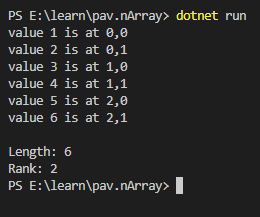
            Console.WriteLine($"value {myInts[i,j]} is at {i},{j}" );
           
    Console.WriteLine("\nLength: {0}", myInts.Length);
    Console.WriteLine("Rank: {0}", myInts.Rank);


The length property still returns the total number of elements in Array, however the Rank property returns the total number of dimensions. In the above example we can see that there as 6 elements in our array, however there are 2 dimensions

A caveat of arrays is that when duplicating an array using the Clone() function we create a shallow copy of our array. A shallow copy is a tricky concept to wrap one's head around at first, at a very high level, when dealing with data we have two concepts, the Stack and the Heap, you can think of the stack as an index to the heap. When we create a shallow copy of something we add a second reference to the heap and put that reference on the stack.

If you make changes to a shallow copy that change will be reflected in the original however this shallow copy is restricted to the actual elements within the array and not the array itself. meaning that if instead up updating elements we replace them with newly instantiated ones we break the reference to the original item.

That might sound a bit confusing, so let's illustrate this point, start by creating a very simple person class.

    
    public class Person
    {
        public string Name { get; set; }
        public int BirthYear { get; set; }
        public Person(string Name, int BirthYear)
        {
            this.Name = Name;
            this.BirthYear = BirthYear;
        }

        public override string ToString()
        {
            return $"{this.Name} born {this.BirthYear}";
        }
    }


Above we create a Person class with two properties, a name and a birthyear, two things that a commonly used to identify people. 


Next let's create a Person class, add two elements to it and clone it.


    Person[] orginal = new Person[] { new Person("Pawel", 84), new Person("Tomek", 88) };

    Console.WriteLine("\nPeople in the Original Array");
    foreach(var p in orginal)
        Console.WriteLine(p);

    Person[] cloned = (Person[])orginal.Clone();

    Console.WriteLine("\nPeople in the cloned Array");
    foreach(var p in orginal)
        Console.WriteLine(p);


nothing special if we run our code, we'll get the following.


exactly what one would expect, we create an array, clone it and everything comes out looking the same, but now let's change Pawel to Natalia, born in 89.


    Person[] orginal = new Person[] { new Person("Pawel", 84), new Person("Tomek", 88) };

    Console.WriteLine("\nPeople in the Original Array");
    foreach(var p in orginal)
        Console.WriteLine(p);

    Person[] cloned = (Person[])orginal.Clone();

    Console.WriteLine("\nPeople in the cloned Array");
    foreach(var p in cloned)
        Console.WriteLine(p);


    //First elmenent of cloned array changed
    cloned[0].Name = "Natalia";
    cloned[0].BirthYear = 89;

    Console.WriteLine("\nPeople in the Original Array after first element updated in cloned array");
    foreach(var p in orginal)
        Console.WriteLine(p);

    Console.WriteLine("\nPeople in the cloned Array after first element updated in cloned array");
    foreach(var p in cloned)
        Console.WriteLine(p);


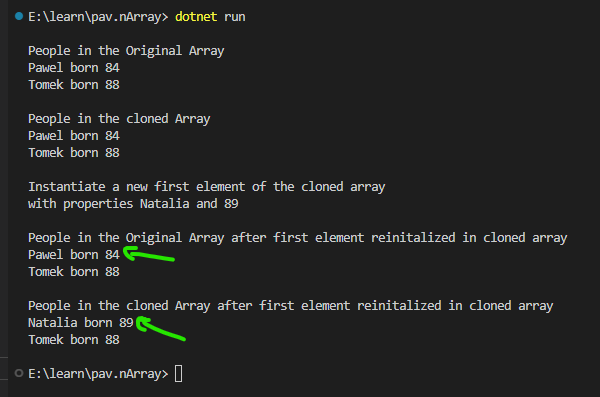
now this is probably a less than desirable situation, as you can see above, we changed the properties of the first element in our cloned array, and they were updated in both the original as well as cloned arrays.  


Most likely not what we had in mind, now the strange part is that this shallow copy isn't to the actual array, it's to the elements of the array, meaning that if we instead instantiate a new first element for our cloned array, the original should not be affected.


    Person[] orginal = new Person[] { new Person("Pawel", 84), new Person("Tomek", 88) };

    Console.WriteLine("\nPeople in the Original Array");
    foreach(var p in orginal)
        Console.WriteLine(p);

    Person[] cloned = (Person[])orginal.Clone();

    Console.WriteLine("\nPeople in the cloned Array");
    foreach(var p in cloned)
        Console.WriteLine(p);

    Console.WriteLine("\nInstantiate a new first element of the cloned array");
    Console.WriteLine("with properties Natalia and 89");
    cloned[0] = new Person("Natalia", 89);

    Console.WriteLine("\nPeople in the Original Array after first element reinitalized in cloned array");
    foreach(var p in orginal)
        Console.WriteLine(p);

    Console.WriteLine("\nPeople in the cloned Array after first element reinitalized in cloned array");
    foreach(var p in cloned)
        Console.WriteLine(p);
    Console.WriteLine();


In the above rather than changing the properties of the first element, we instead reinitialized that first element in the cloned array and thus the change is not reflected in the original array.


and that's all for this one.

Friday, 1 May 2015

Array: 1 Dimensional

An array can be though of as a sequential list of a particular type of object in which each object is refereed to by a zero based index. Zero based simply means that the first elements address is 0. One can think of it as a single row or column of a table.

For example if we created an array of 10 random numbers it would look something like this

Index 0 1 2 3 4 5 6 7 8 9
value A B C D E F G H I J

The syntax to declare an array is generally something along the lines of

    
    char[] myArrayOfChars = new char[10]
myArrayOfChars[0] = 'A';
       myArrayOfChars[1] = 'B';
      myArrayOfChars[2] = 'C';
      myArrayOfChars[3] = 'D';
      myArrayOfChars[4] = 'E';
      myArrayOfChars[5] = 'F';
      myArrayOfChars[6] = 'G';
      myArrayOfChars[7] = 'H';
      myArrayOfChars[8] = 'I';
      myArrayOfChars[9] = 'J';


Above we define an array called myArrayOfChars and we specify that it can only contain the type char and it only has space enough for ten of them.

Enough talk, let's create a console application to demonstrate what we're talking about.

Let's start by creating our application
dotnet new console -n oneDimArray --use-program-main

with our application created let's now open it up in ms code
code oneDimArray 


Paste in the following code

    
    namespace oneDimArray;
    class Program
    {
        static void Main(string[] args)
        {
            char[] myArrayOfChars = { 'A', 'B', 'C', 'D', 'E', 'F', 'G', 'H', 'I', 'J' };
       
            for(int i = 0; i < myArrayOfChars.Length; i++)
                Console.WriteLine($"i={i} v={myArrayOfChars[i]}; ");
        }
    }


In the above we define our array a little differently,  here rather than defining our array size and manually specifying the value at each index we do it all in one swoop. If we run our application we'll see the following.


We've iterated over each our our elements and outputted it's value. You may be wondering ok, but what would happen if we tried to print out myArrayOfChars[10], since we only have 0 to 9 defined, we'll let's find out. Let's add the following after our for loop.

    
    Console.WriteLine($"i={10} v={myArrayOfChars[10]}; ");


Now let's run our application with "dotnet run" 

we should get the same output as before but with an exception thrown at the end 

Unhandled exception. System.IndexOutOfRangeException: Index was outside the bounds of the array.
   at oneDimArray.Program.Main(String[] args) in D:\learn\oneDimArray\Program.cs:line 14

this is our first Runtime exception, that is to say it's not a syntax error, the code is written correctly, however since there is no 10th "Spot" in our array we get an IndexOutOfRange Exception.